Best keyboard for whatsapp chat in mobile
So hello guys, usually every one will use the keyboard in mobiles which is very old version and default keyboard app only it dont have any features of latest versions like emojis, fonts, styles, dictionary, artificial intelligence etc…in old keyboards but you may use all the above features for freely with small trick that is what iam going to tell about it on this article so stay tuned till the end Best keyboard for whatsapp chat in mobile.
Best keyboard for whatsapp chat in mobile :
- now a days every one will have girlfriend or boy friend so mainly you may connect with your girlfriend in only whatsapp and other instagram, facebook apps.
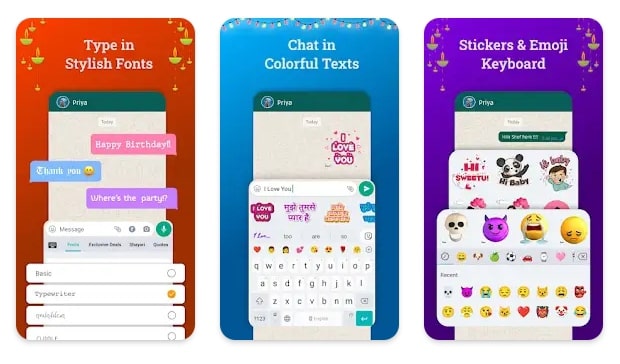
- commonly in the chat conversation by sending some emojis according to your mood to other person they feel crazy and cool to chat with you.
- in additionally they will show the more interest while chatting with the help of amazing emojis guys.
- so if you dont the correct spellings in english then also we can chat in english with the help of keyboard dictionary.
- it will automatic detect the spelling what you wanted to type in seconds and it will shows to us the spelling too.
what is the amazing application name :
- so to download this keyboard we can get more benefits which are additionally having in it.
- commonly in the default keyboard you may not translate the language but it is possible now in this latest keyboard.
- without any discussion lets go to playstore right now friends.
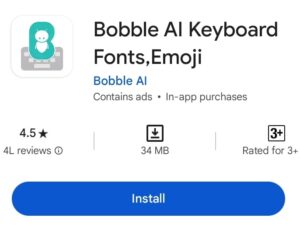
- then in playstore find the app called BOBBLE AI KEYBOARD FONTS,EMOJI.
- it is developed from the Bobble AI management only with the size of 34 Mb.
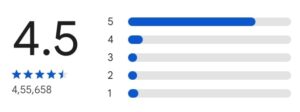
- this best keyboard is very popular because it has 4.5 star ratings with 5 crores plus downloaders.
- to know the public opinion about this application you could see the reviews written by people who loved and impressed for app.
keyboard Installation later :
- mean while after pressing the install button app will takes few seconds to download it on our mobile guys.
- whenever installation completes you need to enter on it.
- the pop with asking permission will opens to search device for installed apps, and welcomes banner shows.
- do agree that option then you might have to choose the app language.
- for example if you know telugu or hindi or english and other languages then simply select what ever you require.
- Just iam choosing english keyboard, then next you need to enable bobble ai key board from settings guys.
- set it has the default one so that no disturbances will come from now on using time of Best keyboard.
CHECK OUR MORE ARTICLES FROM HERE :
Set name widget on mobile screen
How to make calls without recharge new trick
How to hide photos videos in calculator
change charging screen on any mobile
How to set live wallpaper in mobile
how to use bobble keyboard :
- you could start the tutorial or sample from app only that how it will works on next.
- the exact interface of app shows on app so from here you could practice.
- in the choosen language app will generates the key board.
- so from now what ever you chat with your friends will being crazy.
- this Best keyboard app give the more energy with its features.
send crazy emojis like this :
- at the top of keyboard layer we able to see the emojis.
- but the difference between the default keyboard app or this Best keyboard app you might see here.
- to send your friends like emojis of launching or feeling happy or heart symbol and other.
- just do hold the emojis for 2, 3 seconds and push it send thats it see the miracle.
- the emojis will automatic becomes very crazy and real emoji with animation of that emojis will be Sended to others.
- so this appears very cool and funny to others they will defienetly ask you about this trick guys.
Ai feature working process in bobble keyboard :
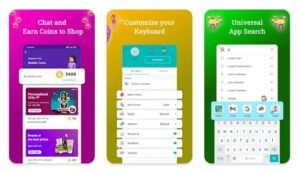
- On the current Keyboard screen you observe the Ai bobble on right side middle corner with Ai option.
- so now do click on it then key board will extend and added with ai generated stickers like hello, bye etc..other images added emojis will available.
- those are absolutely free to use at any time you could use them.
- to change the language or to translate the words you have typed in then choose the translate icon to change any language.
- additionally we could create our own emojis with our real face too.
overall conclusion about Best keyboard :
- with the help of this Best keyboard bobble we could take make our chatting more better with others.
- usually by chatting with normal way like with default key board way we cant able send any this much things in it.
- but with this simple trick you could add more stuff while chatting with friends and in group discussion.
- lets download this amazing bobble key board have fun while chatting and with others guys.
- we will back soon with awesome new trick like in this article untill bye…
DOWNLOAD THIS APPLICATION FROM HERE